
How to ask questions about a long PDF on your iPhone
Find the cancel clause, the notice period or the deadline in a 40-page PDF on your iPhone by asking it, with the page each answer came from.
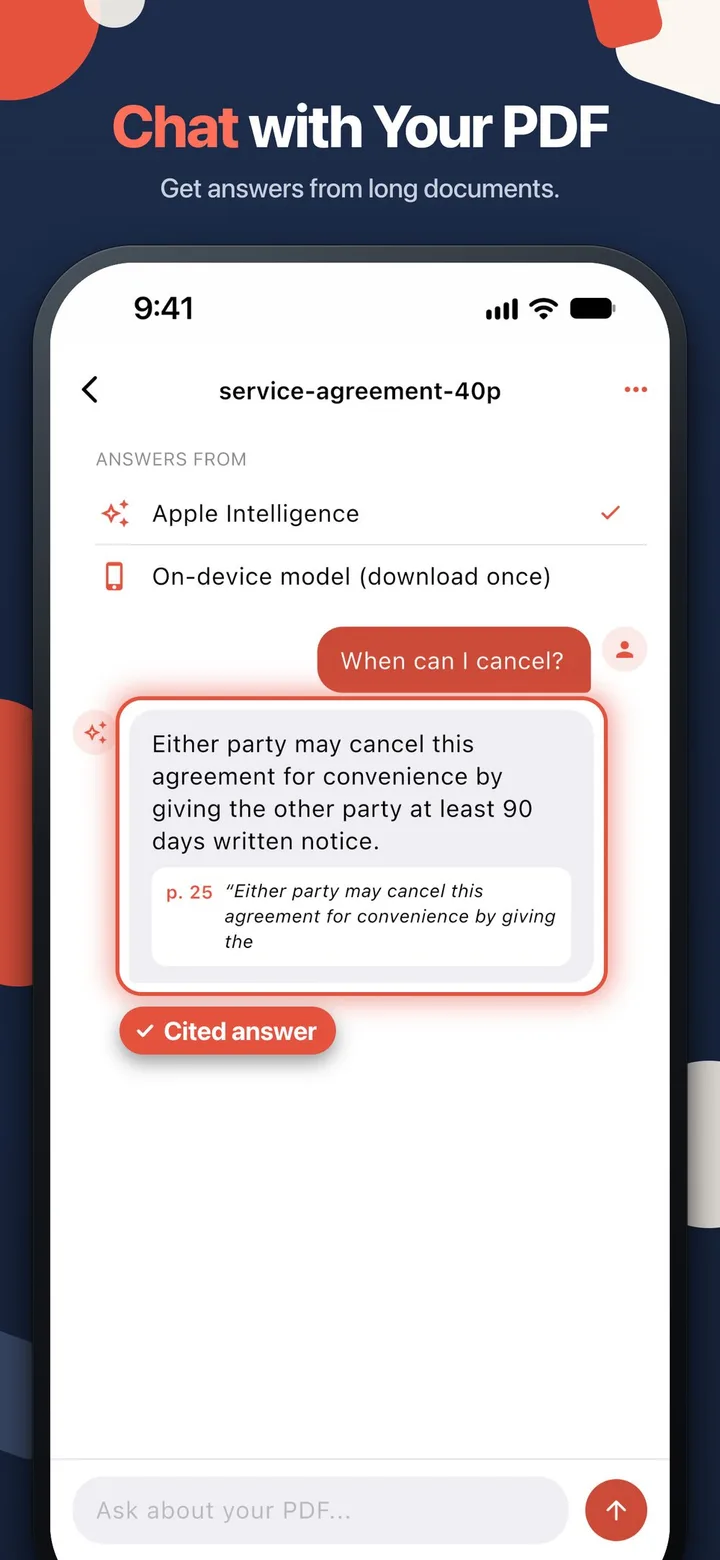
A 40-page service agreement lands in your inbox and you only need one thing from it: how much notice you have to give to cancel. Scrolling through it on a phone screen, you skim past the right paragraph twice.
This guide shows two ways to find answers in a long PDF on your iPhone: the plain search that’s already on your phone, and asking the document a question in myPDF, with the page each answer came from. We make myPDF, so it’s the tool we know best. Chat is part of myPDF Pro.
First try: search for a word
If you know the exact word, you may not need anything else. Open the PDF in Files, tap the search icon and type “cancel” or “notice”. Most PDF apps, myPDF included, can search the text of a PDF.
Search works well when the document uses the word you expect. It gets slow when it doesn’t. A contract might say “terminate” instead of “cancel”, “written notice” on one page and “notice period” on another, and a word like “fee” can show up thirty times. That’s where asking a question helps.
How to ask a PDF a question on iPhone
- Open the PDF in myPDF. If it came by email, save the attachment to Files first, then open it from there.
- Open Chat. At the top you see where the answers come from.
- Pick where the answers come from. On an iPhone or iPad with Apple Intelligence, you can use Apple Intelligence. Without it, Chat uses an on-device model that you download once (about 1.6 GB). After that download it runs on your phone.
- Type your question in the “Ask about your PDF…” field and send it. Ask it the way you’d ask a person: “When can I cancel?”, “What’s the payment deadline?”, “Who pays for repairs?”
- Read the answer and the quote under it. Each answer comes from the document’s own text and shows the page it came from, with the sentence it’s based on.
- Tap the quote to jump to that page. Read the full paragraph there before you act on it.
Ask better questions
- One thing per question. “When can I cancel and what does it cost?” works better as two questions.
- Use the document’s words when you know them. If the contract talks about “termination”, ask about termination.
- Ask for the place, not only the answer. “Where does it talk about renewal?” gets you to the right page, and then you read it yourself.
- Follow up. If the first answer points to page 25, ask what page 25 says about the notice period.
Check the page before you rely on it
The page number is there for a reason. An answer is a pointer to the right spot in the document, not legal advice. Contracts often have an exception two paragraphs later, a definition at the start, or an annex that changes a date. So:
- Open the cited page and read the whole clause.
- Look for words like “unless”, “except” and “subject to” near it.
- If the answer matters (money, a deadline, a lease), read the section yourself, and ask someone who knows the field if you’re unsure.
What this can’t do
- It needs real text. If the PDF is a photo or a scan without a text layer, there’s nothing to read on those pages. Make the scan searchable first. Our guide to scanning a searchable PDF explains the difference.
- It only knows this document. Chat answers from the PDF you have open. It doesn’t know the law in your country or what another document says.
- It isn’t a lawyer. It finds and quotes text. Whether a clause is fair or holds up is a different question.
- It needs Apple Intelligence or the one-time download. Without Apple Intelligence, the first use needs space and a connection for the download of about 1.6 GB.
- iPhone, iPad and Mac only. These steps are written for iPhone and iPad. On the Mac, Chat needs Apple Intelligence and only shows up where it’s turned on. Chat is not in myPDF on Android.
Quick tips
- Rename the file in Files before you start (“Gym contract 2026.pdf”), so you can find it again later.
- Once you know what you’re agreeing to, you can sign the PDF on your iPhone without printing it.
- If a page is hard to read on a small screen, highlight the clause you found, so you can come back to it later. See how to highlight a PDF on your iPhone.
A question with a page number gets you to the right paragraph in seconds. Reading that paragraph is still your job.